Contact Support
Contact Support
Send us a message: https://recapmycalls.com/recap-support/
Use the contact form on that page. It reaches us directly and we reply by email.
What to tell us
You do not need to finish a diagnostic checklist before writing in. But RECAP sits in a chain of three or four devices, and the same symptom can come from any link in it — so these five answers are usually the difference between one reply and five.
1. What device do you make calls on? Phone, desk phone, tablet, or computer — and the model if you have it handy.
2. What are you recording onto? A computer, a voice recorder, a phone with a USB audio adapter — or nothing yet. This is a separate device from the one you make calls on.
3. Does your headset have a microphone on the cable, and what make and model is it? Look for a boom arm, or a small inline blob partway down the wire. This one matters more than any other answer — see Headset Compatibility. The model helps us spot the handful of headsets that are wired unusually.
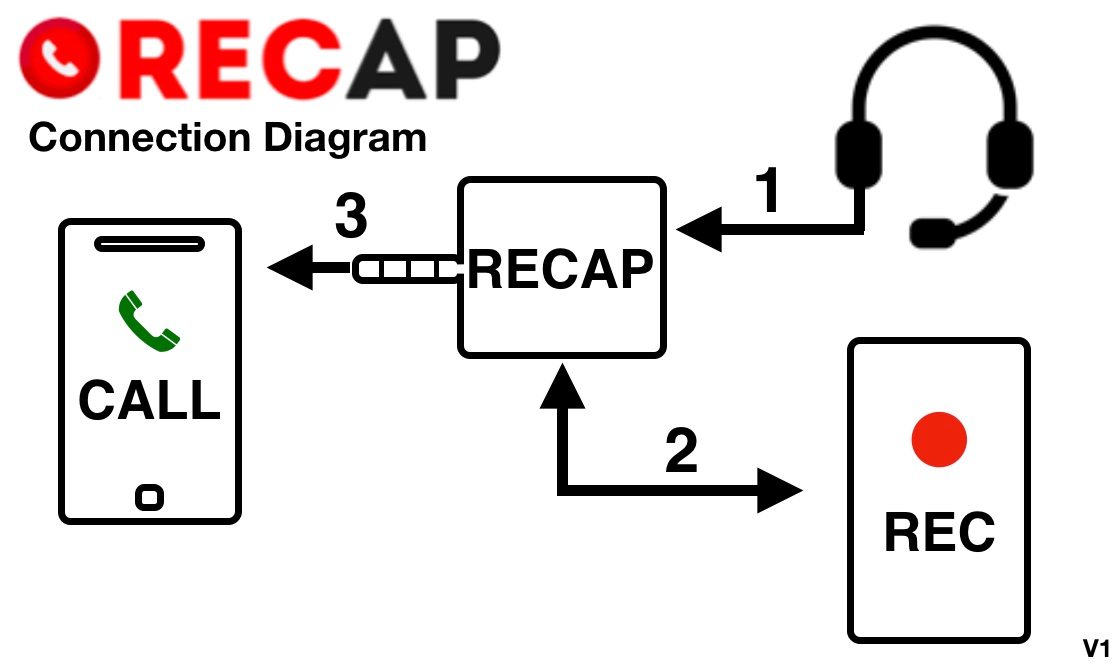
4. What is plugged into what? The full chain, in order. The easiest way to tell us is against this connection diagram — say where your setup matches it and where it differs. That's far more useful than a description in words.
5. Does it work without RECAP? Plug the headset straight into your call device and make a test call. Can you hear them, and can they hear you?
If it's a recording problem, add: a screenshot of the device scanner results, what you hear on playback (silence, one side only, too quiet), your operating system and recording software, and — if you swapped the cable that came in the box — what cable you're using instead.
If your callers say you sound muffled, add: which rung of the three-rung ladder it first got worse at.
Try these first
Many issues resolve in a couple of minutes, and the answer is usually one of these:
- Callers say I sound muffled or distant — about the live call, not the recording
- No audio recorded — silent, one-sided, or one-ear
- Low volume, noise, or swapped channels — includes the Lightning/USB-C connection order fix
- Device scanner and USB adapter — the full step-by-step diagnostic flowchart
- FAQ
Website: https://www.RecapMyCalls.com